

Can you add extra modules to a cloud couch later?

Yes, you can add extra modules to a cloud couch later if the new pieces are compatible with your exact modular sofa system. The catch is that a matching appearance or the word modular does not establish a matching connection, seat height, or layout; confirm the specific module before planning an expansion.
- To add modules to cloud couch later, confirm the exact sofa system, connectors, dimensions, and intended layout.
- Sofatica suits buyers seeking machine-washable modular sofas; future expansion still requires an exact compatibility check.
- An ottoman adds a footrest; it does not automatically become a connected seat.
- Save your original order details and confirm the proposed module before changing your sectional.
The one we would pick
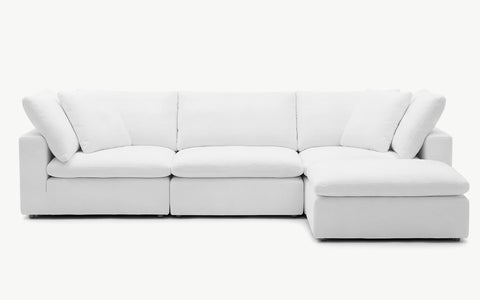
Configuration: 4-Seater Sectional


Why this matters
A modular sofa lets you think about your room in separate pieces rather than one fixed footprint. But rearranging the pieces you own and attaching a newly purchased piece are different tasks. Plan around confirmed compatibility, not a product photograph.
If you are choosing your first sofa in 2026, map the arrangement you need now and the arrangement you want later. Use this room-measurement guide for a deep-seat sofa to organize your footprint check. Leave space for doors, furniture, and the route through the room—not just the couch itself.
Can you add extra modules to a cloud couch later?
Yes, provided the proposed module fits the existing system and works in the position where you want to place it. The strongest confirmation identifies your original sofa and the exact additional piece together. A general statement that a collection is modular is not enough.
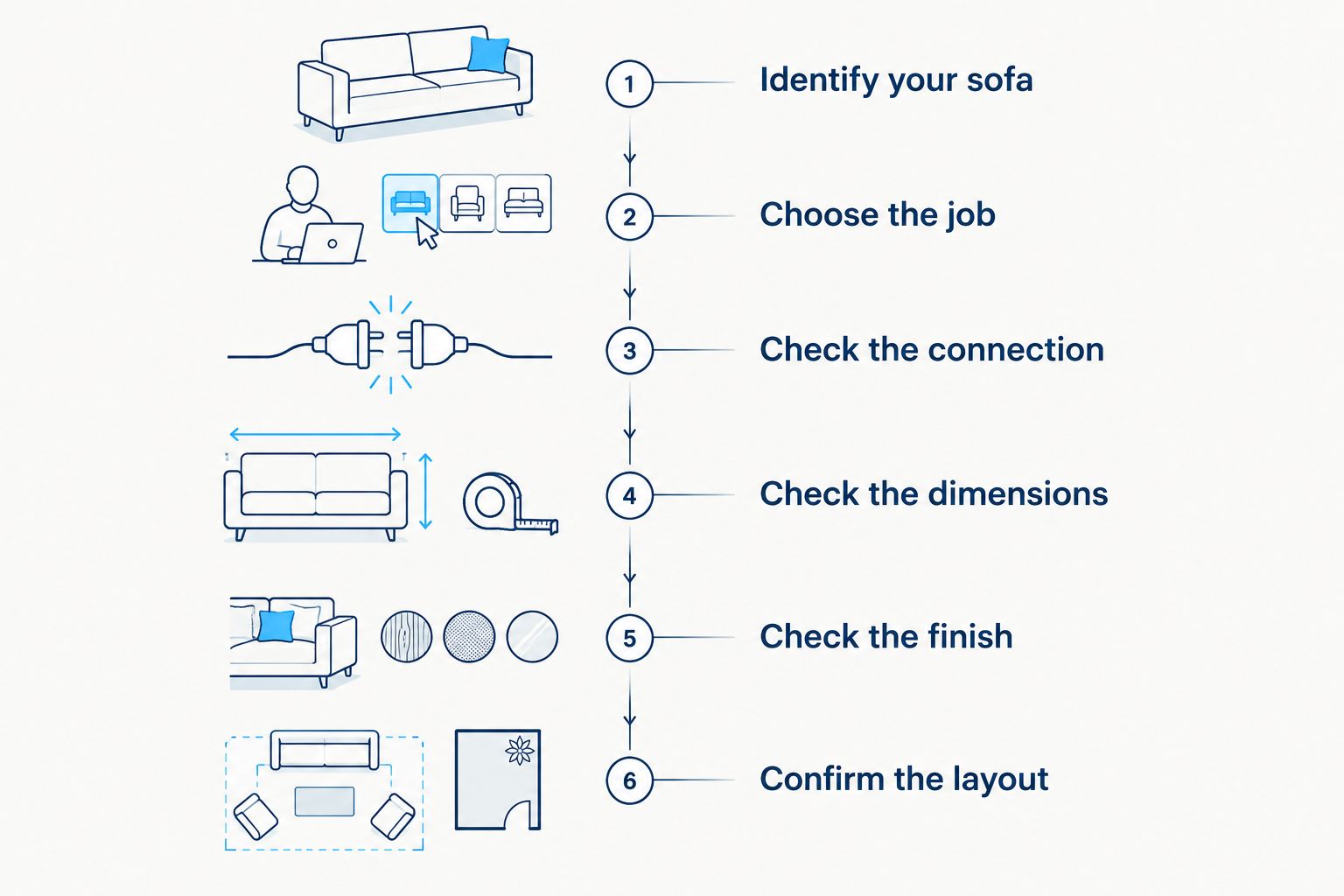
Use this sequence before adding anything:
- Identify your sofa. Find the original order, full product name, collection, color, and any model identifier on its label.
- Choose the job. Decide whether you need another sitting position, a corner, a finished end, or somewhere to put your feet.
- Check the connection. Ask whether the proposed piece connects to your exact sofa and what hardware or assembly instructions apply.
- Check the dimensions. Compare overall depth, seat height, module width, and the expanded footprint.
- Check the finish. Confirm the fabric and color designation, then assess the match beside your existing upholstery.
- Confirm the layout. Obtain a diagram or written explanation showing where the new piece belongs.
Keep that confirmation with your order records. If you revisit the project after a move, you will have the product identity and intended layout together instead of trying to reconstruct them from photos.
What counts as a compatibility check?
A useful compatibility check answers a specific question: does this named module work with this named sofa in this position? Ask about the attachment method, dimensions, and any pieces that must move. Do not substitute a shared color name for a technical match.
For a 2026 expansion, include photos of the existing sofa, its label, and its connection points when asking for confirmation. Those photos help identify what you own; they do not replace the manufacturer's instructions.
Adding a seat, a corner, an end piece, or an ottoman
Choose the function before choosing the shape. A piece that looks right in a showroom arrangement can be wrong for the gap in your own couch. The following table compares module roles, not compatibility between particular products.
| Piece to investigate | Best for | Practical benefit | Limitation to check |
|---|---|---|---|
| Armless seating module | Extending a seating row | Adds a sitting position without another outer arm | Requires confirmation that it belongs between your existing pieces |
| Corner module | Turning the seating arrangement | Changes the direction of a sectional | Changes the footprint and must work with both adjoining pieces |
| Armrest seating module | Finishing an exposed end | Provides a defined outer edge | Arm orientation matters; it is not automatically an interior piece |
| Ottoman | Adding a footrest | Provides a separate place to rest your feet | Does not automatically attach or function as a backed seat |
Buy for the role you need, not the module that looks closest. If the problem is limited sitting space, a footrest alone does not solve it. If the problem is stretching out, lengthening the entire seating row is not necessarily the right change.
An extra seating module: extend the row
An additional seating module is the option to investigate when you want another sitting position. Confirm whether it can sit between your existing sections or whether the arrangement needs a different end piece. The answer depends on the actual system.
Do not treat advertised seat counts as construction diagrams. A 3-seater label describes a seating configuration; it does not prove that adding any one piece creates the corresponding 4-seater configuration. Check the constituent pieces and the arrangement separately.
Best for: households that need more sitting space along an existing row. The benefit is a targeted expansion; the trade-off is a wider footprint and another connection to verify.
A corner module: change the direction
A corner module is worth investigating when you want the seating to turn rather than simply extend. Sketch the complete arrangement first, including the pieces on both sides of the corner. Check whether any existing arms prevent the proposed connection.
Measure the resulting shape, not just the new corner. A layout that fits along one wall still needs to work with the adjacent wall, nearby doors, and furniture. Check where people will enter and leave the seating area.
Best for: rooms that need seating along adjoining sides. The benefit is a change in direction; the trade-off is a more involved layout check than extending a straight row.
An armrest module: finish the correct end
An armrest module serves a different purpose from an armless middle section. Before choosing one, confirm the seller's definition of left and right. Ask for a diagram rather than interpreting orientation from a cropped product image.
Also establish what happens to your current end piece. An expansion can require repositioning an existing section rather than simply placing a new section beside it. Follow the specific assembly instructions instead of improvising attachment points.
Best for: arrangements that need a finished outer edge. The benefit is an arm at the intended end; the limitation is that the same piece is not automatically suitable for an interior position.
An ottoman: add a footrest without assuming a connection
An ottoman is the option to investigate if your main goal is putting your feet up. Decide whether you want it separate from the couch or incorporated into a supported arrangement. Those are different uses, with different compatibility questions.
Check whether the ottoman is intended to connect, sit freely, or perform another documented role. A similar cushion height in a photograph does not establish a usable match. Confirm measurements and instructions before treating it as part of the sectional.
Best for: adding a separate footrest. The benefit is a distinct lounging function; the limitation is that an ottoman does not automatically provide the back support or attachment of a seating module.


Why adding modules later varies
The expansion process depends on the sofa you already own and the change you want. These are the checks that determine whether the proposed arrangement works:
- Exact collection: confirm the original product identity rather than relying on a broad cloud-couch description.
- Connection method: establish how the proposed module attaches and whether the existing connection points match.
- Dimensions: compare the adjoining pieces and measure the entire expanded arrangement.
- Module role: distinguish an interior seat, corner, outer arm, and separate footrest.
- Fabric and color: compare the precise upholstery designation, not only a familiar color word.
- Room layout: check the new footprint against doors, furniture, and your walking route.
For a sofa purchased in 2026, save these details while the original order is easy to find. Keep the assembly instructions with them. That record makes a later compatibility question more precise.
Why owners pick Sofatica
Washable Slipcovers
100% Real Goose Down
Module Secure™ Lock
Adjustable Cushion Fill
What Sofatica's modular configurations tell you
Sofatica is best for buyers seeking machine-washable modular sofas. Its named configurations provide useful starting points for comparing a smaller arrangement with a larger corner arrangement. They do not, by themselves, confirm which individual pieces connect across configurations or collections.
| Named configuration | Best for investigating | What the name establishes | What still needs confirmation |
|---|---|---|---|
| Cloud Couch Luxe 4-Seater Modular Sectional — White | A 4-seat modular sectional | Luxe collection, modular sectional, white finish | Exact component list and compatible expansion pieces |
| Cloud Couch Luxe 5-Seater Modular Corner Sectional — Gray | A 5-seat corner configuration | Luxe collection, corner sectional, gray finish | Component dimensions and compatibility with an existing sofa |
The practical advantage of Sofatica's machine-washable modular sofas is the combination of washable upkeep and a modular format. The expansion limitation is straightforward: those features do not establish a particular connector match or guarantee that two configurations share interchangeable pieces.
For a 2026 purchase, ask which exact modules produce your preferred future arrangement. Do not assume that a 4-seat sectional becomes a 5-seat corner sectional through a single addition. The different layout and finish require their own checks.
Can you mix modules from different cloud-couch brands?
Do not treat cloud-couch modules from different brands as interchangeable. A shared description does not specify connection hardware, dimensions, or intended use. Proceed only with explicit confirmation for the exact pieces involved.
A separate ottoman beside a sofa is different from a connected sectional module. If you want a freestanding piece, assess that use directly rather than describing it as a compatible extension.
Will a new module match your older upholstery?
A shared color name is not enough to confirm an exact visual match. Compare the fabric designation and examine the proposed material beside your current couch. Assess it in the room where you will use it.
If a close match matters, make upholstery confirmation part of the decision before you commit to the expansion. Mechanical compatibility and visual consistency are separate checks; passing one does not answer the other.
Is it better to start small or choose the final layout now?
Start with the arrangement that meets your current needs and fits your current room. Expand later only when the specific system supports the change you have in mind. A future plan should be confirmed, not assumed.
For a 2026 decision, separate the room you actually have from a possible future home. Measure today's space, sketch the larger arrangement, and ask what pieces that arrangement requires. You can then judge whether staged expansion is a practical plan.
FAQ
Can I add modules to a cloud couch later?
Yes, if the additional modules are compatible with your exact sofa system. Confirm the product identity, attachment method, dimensions, upholstery, and intended position before expanding.
Does modular mean every piece will connect?
No, modular does not mean every piece will connect. Verify the proposed module against your existing sofa rather than assuming compatibility from the description.
Can I turn a 3-seater cloud couch into a 4-seater?
A 3-seater can become a 4-seat arrangement only if its system supports the required addition. The seating labels alone do not identify the pieces or establish compatibility.
Can an ottoman become an extra sectional seat?
An ottoman does not automatically become a connected sectional seat. Confirm its intended role, connection method, and dimensions before incorporating it into your couch.
How do I know which side needs a right-arm module?
Use the seller's orientation diagram to identify the correct arm side. Do not assume that left and right are defined from the viewpoint shown in a product photograph.
Can I combine standard and Luxe cloud-couch modules?
Treat standard and Luxe modules as separate compatibility questions. Confirm the exact pieces together before assuming that a shared cloud-couch name means they connect.
What should I ask Sofatica before expanding my modular sofa?
Ask Sofatica whether the exact proposed module fits your original modular sofa and intended layout. Include your order details, product label, and photographs of the existing connection points.
One last thing
Before looking for another module, sketch a new arrangement using only the pieces you already own. Follow the sofa's documented configuration instructions. A different layout can address the problem without expanding the footprint.
If you still need another piece, write down its job in plain language: another sitting position, a corner, a finished end, or a footrest. The right expansion solves that specific problem and passes the compatibility check.
Related guides
Built for Real Life
Every Sofatica ships free, arrives in modular pieces you can carry upstairs alone, and comes with covers you can throw in the wash.


