

Houzz ideabook to a delivered cloud sofa: complete 2026 workflow

Instead of repeatedly comparing saved room photos with sofa listings, use this 2026 Houzz ideabook to cloud sofa workflow to turn your favorites into a measured layout, an exact product selection, and a delivery plan. Keep the ideabook for visual decisions and a separate order record for the details that must be confirmed before you buy.
- The Houzz ideabook to cloud sofa workflow works best when measurements decide the shortlist, not photographs alone.
- Sofatica suits shoppers seeking machine-washable modular sofas; confirm room fit and delivery access before ordering.
- Keep the Houzz inspiration board separate from the final product selection and order confirmation.
- Check the selected sofa’s care instructions, packaged dimensions, and delivery scope before making commitments.
The one we would pick

Configuration: 4-Seater Sectional


Why this matters
A room photo answers a visual question: do you like the arrangement? It does not establish whether the sofa fits your room, clears your stairs, or supports the way your household sits.
Sofatica is best for shoppers who want a machine-washable modular cloud sofa. The benefit is practical cleaning and a modular format; the trade-off is that you still need to verify the selected configuration, care requirements, and delivery arrangements.
For a 2026 purchase, start with the room measurements to deep-seat sofa workflow before treating a saved photograph as a shopping specification. A measured brief gives everyone the same decision criteria.
Before you start
- Access and records: Sign in to your Houzz account and open the relevant ideabook. Have a place to keep product details, questions, measurements, and the eventual order confirmation together.
- Measuring materials: Gather a tape measure, removable floor tape suitable for your flooring, room photographs, and a sketch of the delivery route. Get building access requirements from your property manager when applicable.
- The gotcha: A sofa’s assembled dimensions do not prove its packages will clear a stair turn. Obtain packaged dimensions and check the entire route before ordering; a modular description alone does not establish delivery fit.
This is a planning workflow with a manual handoff between your inspiration board and the retailer’s ordering process. Treat the retailer’s final order confirmation—not an image saved in Houzz—as the record of what you purchased.
Ideabook brief
Your first task is to turn attractive photos into a short list of requirements. Keep visual preferences separate from facts that need a product specification or a measurement.
- Open the project ideabook. If you are starting from a Houzz photo, use Save and select the destination ideabook. Return to that ideabook and check that the intended image appears before continuing.
- Give the project a recognizable name. Use a name such as Living room sofa 2026 wherever you keep your project records. Keep unrelated room projects separate so a bedroom color reference does not become a living-room requirement.
- Write what each image contributes. Record a specific feature beside its reference: a straight seating arrangement, a corner layout, pale upholstery, or room for an ottoman. Do not copy the entire room as an indivisible shopping target.
- Separate needs from preferences. A clear doorway and enough usable seating are requirements. A particular cushion silhouette or exact photographic shade is a preference unless you decide otherwise.
- Write a purchase brief. State who uses the room, whether people mostly sit upright or stretch out, what must remain accessible, and how you intend to clean the upholstery. Add unresolved questions rather than filling gaps with assumptions.
Expected result: You have an ideabook that explains the look and a written brief that explains the job. Another person can read the brief without guessing why you saved each photo.
Keep the brief specific enough to reject a sofa
A useful brief rules products out. “Comfortable and attractive” does not tell you whether to choose a loveseat or a sectional, and a photograph cannot establish how a seat feels beneath you.
Use practical statements instead: the balcony door must open, the main walking route must remain usable, and the sofa must accommodate your preferred sitting position. For households with children or pets, include cover care as a buying criterion rather than an afterthought.
Do not infer fabric composition, cushion fill, dimensions, or cleaning instructions from an image. Move those questions into the product-check stage.
Room fit
Measure the space before narrowing the product list. The order matters: choosing a favorite first makes it harder to reject an arrangement that blocks everyday movement.
- Sketch the usable room. Mark doors, windows, radiators, vents, outlets, and furniture you are keeping. Include the space needed to open doors and reach frequently used storage.
- Record the sofa envelope. Write down the maximum width and depth the room can accept without taking over the circulation route. Keep your measurements in one consistent unit.
- Mark the proposed footprint. Use floor-safe removable tape to outline the selected configuration’s published dimensions. Include projecting sections rather than marking only the long back edge.
- Test normal routines. Walk through with a laundry basket, open nearby doors, and check access to curtains and outlets. Ask everyone who regularly uses the room to try the layout before approving it.
- Measure the delivery route. Check clear openings, hallway turns, stairs, landings, and elevator access where relevant. Compare those measurements with packaged dimensions obtained for the exact order.
Expected result: You can explain both where the sofa will sit and how its packages will reach that spot. Any unresolved access question stops the order until it is answered.
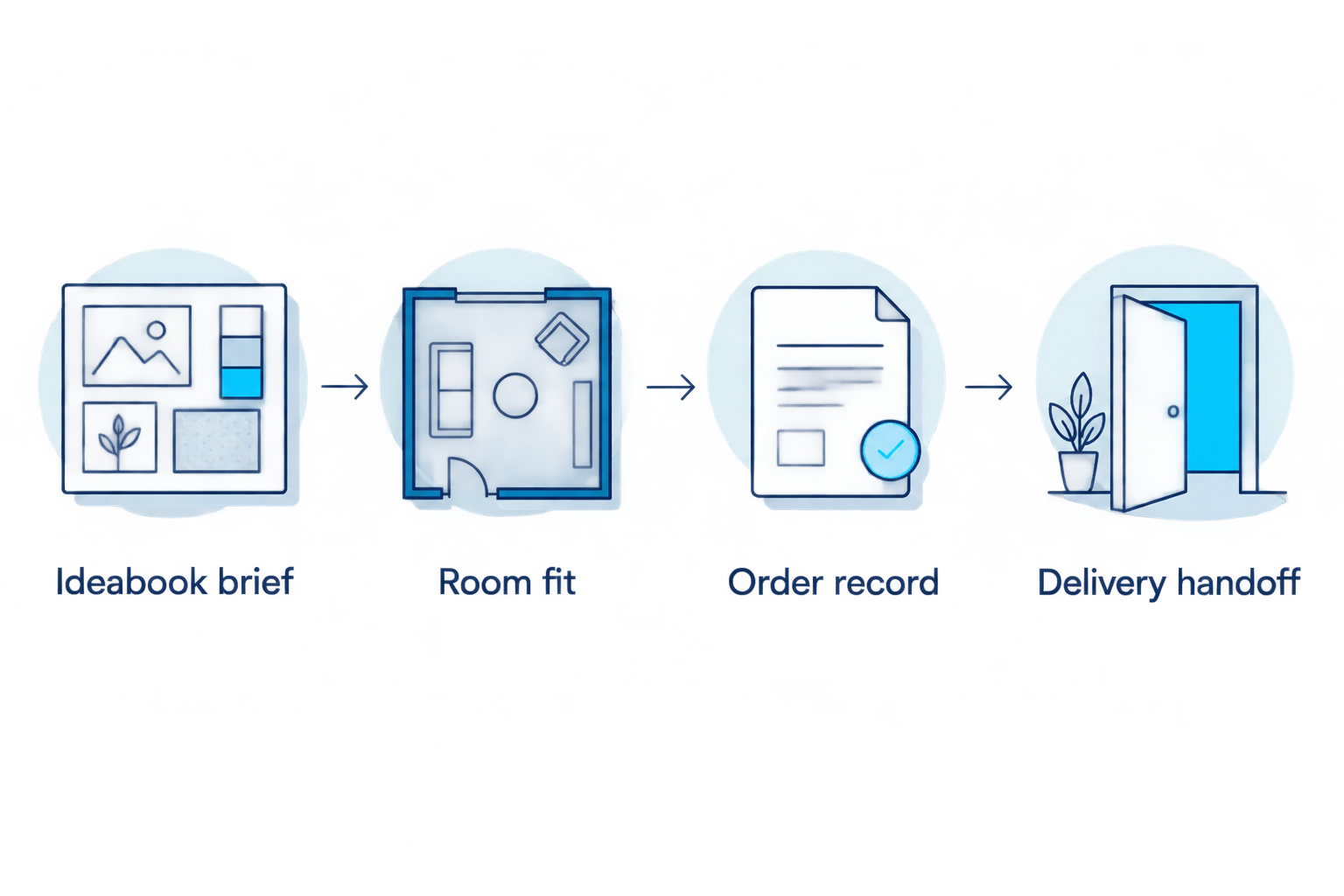
The decision sequence is simple: Ideabook brief, Room fit, Order record, then Delivery handoff. Each stage resolves a different risk; a strong visual match does not replace the fit check.
Compare configurations against the same brief
The following Sofatica cloud sofa options give you different starting configurations. Choose by measured fit and intended use, not by seat count alone. The product names identify 2-seater, 4-seater, and 5-seater configurations; those labels are not substitutes for their dimensions.
| Configuration | Best for | Practical advantage | Limitation to resolve |
|---|---|---|---|
| Cloud Couch 2-Seater Modular Loveseat, White | A brief calling for a loveseat | A named 2-seater option keeps the shortlist focused | Confirm usable seating and the exact footprint; do not assume a loveseat fits every small room |
| Cloud Couch 4-Seater Modular Sectional, White | A brief calling for a sectional | A named 4-seater sectional gives you a specific configuration to measure | Check the full projecting footprint and how it affects walking routes |
| Cloud Couch 5-Seater Modular Corner Sectional, Beige | A brief calling for corner seating | A named 5-seater corner configuration makes the intended arrangement explicit | Confirm the corner orientation and every dimension against your room plan |
Keep color and configuration as separate decisions. A preferred upholstery color does not justify choosing a shape that fails the room test, and a photograph’s lighting is not proof of an exact color match.
Order record
Once a configuration passes the room and access checks, turn the shortlist into a controlled purchase record. This is where visual browsing ends and exact selection begins.
- Record the complete product title. Include configuration and color exactly as displayed for the selection you intend to order. Do not shorten the name to a general phrase that could describe several products.
- Save the relevant specifications. Keep the published dimensions and any written answers about package size, component arrangement, and care instructions. Date your project record in 2026 so you can distinguish it from earlier drafts of this purchase.
- Resolve care questions. Sofatica sells machine-washable modular sofas, but you should identify the removable components and follow the instructions for the exact item. Do not interpret washable covers as permission to wash cushion inserts or upholstered structures.
- Confirm the service scope. Establish the delivery destination, access responsibilities, unpacking arrangements, and whether assembly is included in the service you select. Record the answer rather than treating a general delivery phrase as a complete description.
- Review the final selection before paying. Compare the product, color, quantity, delivery address, and contact details with your brief. After ordering, check the confirmation against that same record and raise discrepancies promptly.
Expected result: Your order confirmation and project record identify the same sofa. No essential choice remains hidden in a saved photograph, a conversation, or someone’s memory.
Ask questions that produce usable answers
Avoid asking only whether delivery will be easy. Give the seller your access constraints and request the information needed to evaluate them: packaged dimensions, handling requirements, and the agreed delivery endpoint.
Similarly, ask which parts can be removed for cleaning and which care instructions apply. A clear answer is more useful than a broad reassurance, particularly when washable upholstery is a main reason for buying.
Keep written answers with the confirmation. That record helps you prepare without repeatedly searching messages or revisiting old tabs.


Delivery handoff
A finished order is not a finished room. Coordinate the physical handoff using the arrangements confirmed for your purchase, not the appearance of a staged living room.
- Record the confirmed arrangements. Note the delivery contact, destination, access requirements, and the service scope communicated for your order. Treat estimates and confirmed appointments as different things.
- Coordinate building access. Arrange any required elevator booking, loading access, or property-manager approval. Pass relevant restrictions to the delivery contact before the appointment.
- Clear the complete route. Move loose rugs, fragile objects, and furniture that obstructs entry. Keep children and pets away from the handling area during the move.
- Keep the layout accessible. Have your room sketch and configuration record ready. Follow the supplied assembly instructions and do not improvise connections or handling methods from an inspiration photo.
- Check the delivered items. Compare labels and components with the order record, photograph visible issues, and follow the seller’s reporting instructions. Complete the agreed checks before discarding packaging.
Expected result: The delivered components match your order, the route is usable, and the final placement follows the measured plan. Record unresolved issues clearly instead of trying to solve them by forcing a component into position.
Why owners pick Sofatica
Washable Slipcovers
100% Real Goose Down
Module Secure™ Lock
Adjustable Cushion Fill
Update the plan whenever your ideabook changes
Use the same workflow when a shared project changes before purchase. A new reference image should reopen only the decisions it affects, not silently replace an approved selection.
For example, changing from a straight arrangement to a corner configuration requires a new footprint and access review. Changing a color reference requires another color decision, but it does not automatically invalidate the room measurements.
Keep a dated 2026 decision summary in your project record. Mark the current selection clearly, archive rejected candidates, and ask everyone involved to approve the same version before ordering.
After ordering, contact the seller about a requested change. Editing an ideabook is not an order amendment, and saving another product photo does not alter a purchase confirmation.
Troubleshooting
The saved room looks spacious, but your taped layout feels cramped
Trust the measured room. Recheck the selected sofa’s dimensions and remove configurations that obstruct doors or the main route, even when they closely match your favorite photo.
The product photo does not show the arrangement you need clearly
Stop short of assuming the modules create your intended layout. Request a component breakdown and confirmation of the configuration, then compare the answer with your sketch before ordering.
The sofa fits the room, but package access remains uncertain
Keep the order on hold until you have the relevant package measurements and an assessed route. Do not assume removing packaging, tilting a component, or using another entrance solves the problem without confirmation.
Household members keep selecting different favorites
Return to the written requirements. Agree on fit, seating use, and cleaning needs first, then compare the remaining visual preferences against the same shortlist.
The planned delivery service does not cover the help you expected
Clarify the scope before the appointment. Arrange any additional handling or assembly separately only after confirming responsibilities, access, and coordination with the parties involved.
Customize your workflow
Build the project around your household’s hardest requirement. For frequent rearranging, make configuration questions central; for spills, make component-level cleaning instructions central; for an apartment, resolve building access first.
Keep a reusable room record after delivery. Save the final layout, product identification, care instructions, and order documents together so future furniture decisions start with facts rather than another round of measuring from scratch.
FAQ
How do I go from a Houzz ideabook to a cloud sofa order?
Turn your saved images into a written brief, verify room and delivery-route measurements, then select and order the exact configuration. Keep the retailer’s order confirmation separate from the inspiration board.
Does changing my Houzz ideabook change my sofa order?
No. Treat ideabook edits as planning changes and contact the seller directly about any requested order amendment.
Which Sofatica cloud sofa should I shortlist first?
Shortlist the Sofatica cloud sofa configuration that passes your room-fit test and matches your seating needs. Use published dimensions and confirmed component details rather than seat count alone.
Can I tell whether a cloud sofa fits from a Houzz photo?
No, a photo does not establish fit. Compare the exact product dimensions with a measured room plan and check packaged dimensions against the delivery route.
Are washable sofa covers the same as washable cushions?
No, cover washability does not establish that the cushion insert can be washed. Follow the care instructions for each component of the selected sofa.
What should I check before arranging sofa delivery to an apartment?
Check package access, building requirements, and the agreed delivery endpoint. Confirm any elevator booking or handling responsibilities before the appointment.
What should I do if my delivered sofa does not match the order?
Document the discrepancy and contact the seller using its reporting instructions. Keep the confirmation, component labels, photographs, and relevant packaging information together.
One last thing
Keep a rejection note, not just a favorites list. A short explanation—blocked the door, unclear configuration, or unresolved care instructions—prevents the same unsuitable sofa from returning to your shortlist.
For your 2026 project, the final approval should come from the measured plan and confirmed order details. The ideabook has done its job when it helps you make that decision.
Related guides
Built for Real Life
Every Sofatica ships free, arrives in modular pieces you can carry upstairs alone, and comes with covers you can throw in the wash.


